Home/My work

My work, outside client projects

Self-initiated work on real products and everyday UX problems, plus Figma craft experiments. These aren't client projects; each one says what's observed, what's a plan, and where AI does or doesn't belong.

Real-world UX case studies

Products I use, problems I noticed

One physical product, one AI-powered app and one big e-commerce homepage. Both start from a real observation, then go through research, design and an honest look at whether AI belongs.

Product UXSignifiersIndependent critique

The GuruNanda toothpaste cap

The ribbed top of the tube looks like the cap, but it's the sealed end. The real cap is the tall green base, which looks like a stand. A small, everyday example of a product sending the wrong signal, and how to fix it with print, texture and color.

Observed
First-time users try to open the top
Principle
Signifiers vs. affordances; Jakob's law
AI?
Not needed. The fix is physical.
GuruNanda post oil pulling toothpaste tube, standing upright on a tall green cap, with a ribbed crimp at the top 12
Product photo: GuruNanda. Pins added by me.
  1. The top looks like the cap. It's flat and ribbed, like a screw cap, so people try to twist or pull it. It's actually the sealed crimp of the tube.
  2. The real cap looks like a stand. The tall green base reads as the bottom of the product, not the part you open.
Fixes
  • Print a small “open” arrow and the word “cap” on the green base.
  • Add grip ridges to the green cap, not the top.
  • Run the label artwork over the crimp so it reads as part of the tube.
  • Show the cap clearly on the box image for first-time buyers.
Read the full case study

Why this topic

I noticed it at home. The GuruNanda tube stands on a tall green cap, and the top end is flat and ribbed. Almost everyone picking it up for the first time tries to open the top. It's a small, everyday example of the core UX skill that has nothing to do with screens: making the right action obvious from the object itself.

What's going wrong

Don Norman separates affordances (what an object lets you do) from signifiers (what tells you how to do it). Here the signifiers point the wrong way. The ribbed top looks like a screw cap, so it says "open here". The real cap is styled like a base or stand, so it says "hold here". People don't blame the tube; they think they're doing it wrong.

It also breaks Jakob's law: most toothpaste tubes people have used open at the narrow end, and the design gives no cue that this one is different.

How I'd research it

  • Five-second test: hand the tube to people who haven't used it and ask, "How would you open this?" Record their first move.
  • First-use observation: watch how long it takes and what they try before it opens.
  • Review mining: read public product reviews for words like "cap", "open" and "confusing".
  • Compare: look at other stand-up tubes and how they mark their caps.

I haven't run these sessions yet; this is the plan. The observation comes from real use at home.

Design fixes

  • Put an "open" arrow and the word "cap" on the green base.
  • Move the grip ridges to the cap, so texture means "turn me".
  • Carry the label artwork over the crimp so it reads as part of the tube, not a lid.
  • Show the opening clearly on the box image for first-time buyers.

Where AI fits

Honestly, it doesn't need to. This is a physical signifier problem, and the fix is shape, texture and print. Knowing when not to add AI is part of good UX judgment.

Note

GuruNanda is a real brand, and this is an independent design critique, not work for the company. The product photo belongs to GuruNanda.
AI in UXUser researchIndependent concept

Netflix: deciding what to watch, with AI

A research plan and concept for the moment people open a streaming app and can't decide. AI helps with situation-based search, picking for two people, and explaining why. Guardrails protect privacy and avoid spoilers.

Context
Netflix began testing OpenAI-powered conversational search in April 2025
Methods
Diary study, interviews, concept test
Measure
Time to play, abandoned browsing
HomeTV showsMoviesS+R
✦Something funny, under 40 minutes, that we'd both like
Watching: Shivani + RahulTime: 40 minMood: lightLanguage: any
Weekend Kitchen
Desk 42
The Lighthouse Club
Small Town Detectives
Why this pickYou both finished two cooking comedies this year. Episodes run 32 min. No spoilers for anything you're watching.
▶ PlayNot tonightSurprise us

Concept screen. Titles are made up; not Netflix's interface.

Read the full case study

Why this topic

"What should we watch?" is one of the most common everyday decision problems, and streaming home screens are where people meet AI most often without noticing. Netflix already uses machine learning for recommendations, and in April 2025 it began testing a conversational, OpenAI-powered search with some iOS users in Australia and New Zealand. That makes it a timely, real case for asking where AI genuinely helps a decision, and where it gets in the way.

Problem framing

Rows of posters are optimized for one person's taste, but people often watch together, with limited time and a specific mood. Search expects titles or genres, while people think in situations: "something light, under 40 minutes, that we both like". Shared profiles also mix tastes and muddy recommendations.

Research plan

  • Desk research: public reporting on Netflix's AI search test, plus a heuristic review of the home screen, search and profiles.
  • Diary study, one week: participants log every "what to watch" moment: who was there, how long it took, and whether they gave up.
  • Interviews (6–8): solo viewers, couples and families, focusing on shared viewing and profile sharing.
  • Concept test: the task "find something you'd both watch in under two minutes", comparing today's browse with the concept.

Hypotheses to test

  • Most decision time is spent browsing, not watching trailers.
  • Couples and families lack a way to say "both of us".
  • People trust a recommendation more when it says why, in plain words.
  • An "undo" ("not tonight") matters more than more options.

These are assumptions to test, not findings.

Where AI could help

  • Situation search: natural-language requests with real constraints for time, mood and who's watching.
  • Group mode: blend two profiles for a shared pick, without changing either person's history.
  • "Why this pick": a one-line, specific explanation, plus an easy way to say no.
  • Spoiler-safe recap: a short reminder of where you left off before resuming a season.
  • Tidy "Continue watching": suggest removing shows that were clearly abandoned.

Guardrails

  • Viewing history stays per profile. Group mode never reveals what the other person watched alone.
  • A "Surprise us" option breaks the filter bubble on purpose.
  • No AI-generated summaries that could spoil unwatched episodes.

How I'd measure it

Time from opening the app to pressing play, how often browsing sessions end without playing anything, and a one-tap "good pick?" rating after watching.

Note

This is an independent concept study, not work for Netflix. The screen is my own design with made-up titles.

Mobile appVariablesComponentsFigma MotionSelf-initiated

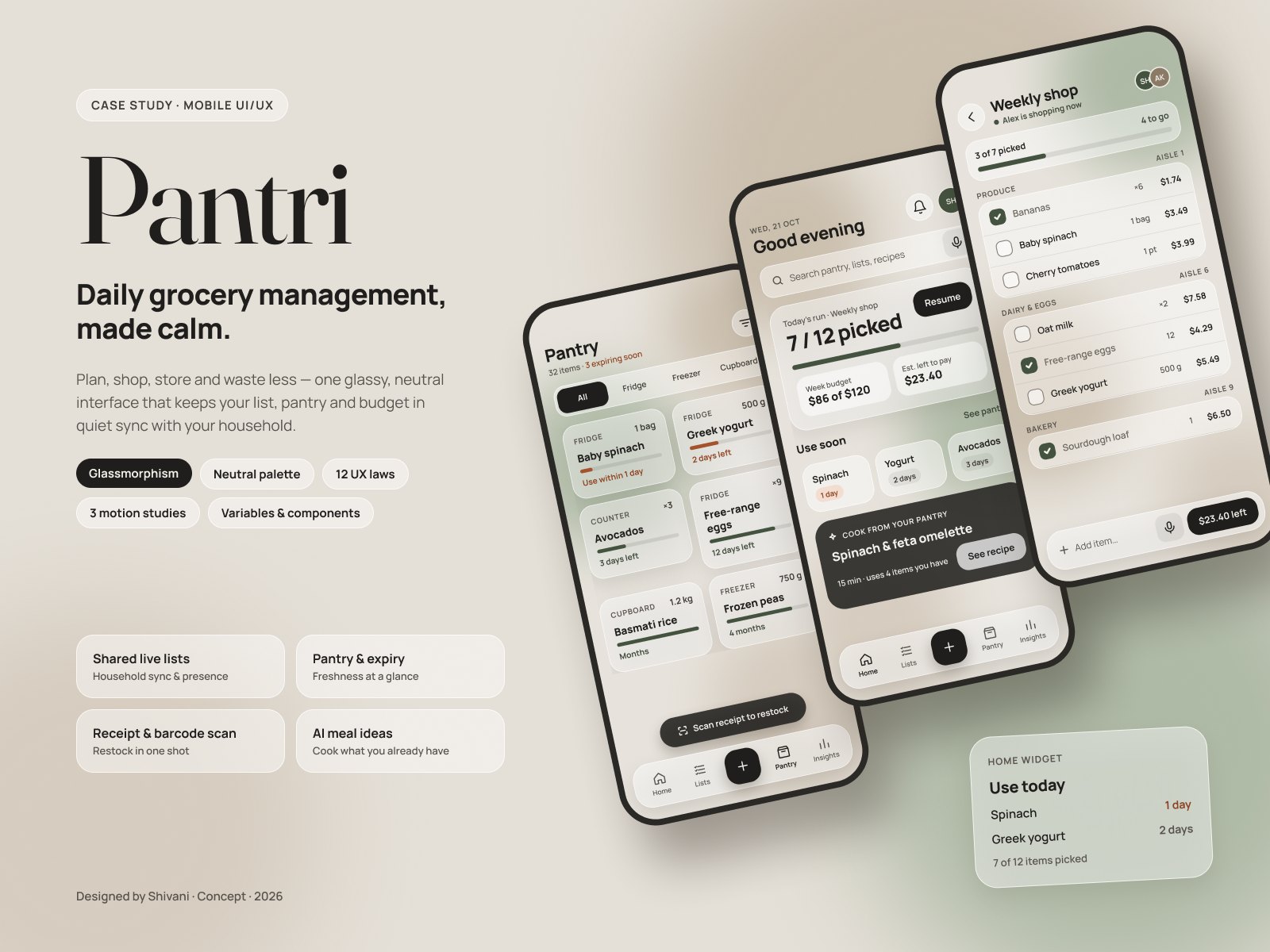
Pantri: cook from what you already have

A grocery and pantry app built around the question home cooks kept asking me at a cooking competition in Dallas: what can I make for dinner tonight with what I have? It suggests dinners from your pantry and swaps for missing ingredients.

Research
Conversations with home cooks, themes, assumptions to test
Figma
80 variables in 4 collections, 20+ components, Smart Animate, Motion
Process
Scope, journey, decisions, system, prototypes, WCAG audit, test plan
E-commerceLaws of UXIndependent redesign

Amazon homepage redesign

A redesign built around why returning customers open the homepage: to track an order, buy again, or pick up where they left off. Every change is tied to a named UX law or WCAG 2.2 check, and both designs are checked the same way.

Laws
Hick, Fitts, Jakob, aesthetic-usability, common region, Von Restorff and more
Checks
10 checks against UX laws and WCAG 2.2, for both designs
Process
Audit, jobs, laws, wireframes, visual design, validation plan
storeDeliver to
Plano 75024
All ▾Search
Hello, sign in
Account & Lists ▾
Returns
& Orders
Cart
AllToday's DealsCustomer ServiceRegistryGift CardsSellPrime VideoBooksMusicFashionHomeToysElectronics
‹Rotating promo banner›
Shop deals in Fashion
See more
Refresh your space
See more
Get your game on
See more
Gaming accessories
See more
Top Sellers in Books for you
Sponsored products related to items you viewedSponsored ⓘ
Best Sellers in Kitchen & Dining
Current (simplified)
store
Search products, brands and ordersSearch
Deliver to Plano 75024OrdersCart (2)
AllToday's DealsPrimeFashionElectronicsHome & KitchenBooksGift Cards
Welcome back, Shivani
Your orderArriving today by 8 PM · 2 items
Ordered · Shipped · Out for delivery · DeliveredTrack package
Pick up where you left off
Viewed today
Viewed yesterday
Viewed Mon
Buy again
Add to cart
Add to cart
Add to cart
DEAL OF THE DAYNoise-cancelling headphonesEnds in 05:12:40 · 32% claimed
Shop by category
Home
Kitchen
Electronics
Fashion
Beauty
Toys
Picked for you because you bought a coffee maker
Product name$24.99
Product name$24.99
Product name$24.99Sponsored
Product name$24.99
Product name$24.99
Redesign
Read the full case study →
UX in the wild

Six everyday UX problems

Quick critiques of things everyone has struggled with. Each one names the principle behind the problem, a practical fix, and an honest answer to whether AI would help.

Signifiers

A door that says “push” with a pull handle

The handle tells your hand to pull, the sign tells your eyes to push, and the hand usually wins. Don Norman's classic example of a design that needs a label to work.

Fix
A flat push plate on the push side; a handle only on the pull side.
AI?
No AI needed. The fix is the shape.
Eyes-free use

Basic car controls buried in a touchscreen

Wipers or hazard lights behind a menu mean looking away from the road. Euro NCAP announced that from 2026, top safety ratings expect physical controls for indicators, hazard lights, horn, wipers and SOS.

Fix
Physical controls for anything used while moving; screens for settings.
AI?
Voice control helps, but it can't replace a switch you find by feel.
Mapping

Which knob runs which burner?

Four burners in a square, four knobs in a row. People guess, turn the wrong one, and learn nothing for next time.

Fix
Lay the knobs out like the burners, or draw a tiny map beside each knob.
AI?
No AI needed. Spatial mapping solves it.
Information design

Stacked parking signs

Four signs on one pole, each with its own days and hours. Drivers have seconds to decide, and a wrong guess costs a ticket.

Fix
One visual schedule: a weekly grid that shows when parking is allowed.
AI?
A real AI win: point the camera at the pole and get “Yes, until 6 PM.”
Feedback & tone

“Unexpected item in bagging area”

The message blames the shopper, doesn't say which item, and locks the screen until staff arrive.

Fix
Name the item, show what the scale saw, and offer a self-fix before calling staff.
AI?
Camera-based item recognition can remove the code lookup for produce, if it explains itself when unsure.
Discoverability

Every hotel shower works differently

No labels for hot and cold, no hint whether to pull, push or turn. Guests learn by getting cold water.

Fix
Label direction and temperature on the control itself.
AI?
No AI needed. One label fixes it.
Figma experiments

Craft practice, built in Figma first

Smart AnimateScroll behaviorAfter delay

Animation experiments

Three prototype patterns built in Figma and coded here so you can try them: a product carousel that scrolls sideways and advances on its own, a product card that grows into its detail page, and sticky section headers over a scrolling list. Each phone shows its Figma prototype settings underneath.

Figma
Horizontal overflow, After delay triggers, Smart Animate with matched layer names, Sticky and Fixed scroll positions
Try it
Swipe the carousel, tap a product, scroll the list
9:41●●● ▮
ShopNew arrivals
👟
Trail runner$128
🎧
Studio headphones$199
⌚
Field watch$240
🎒
Day pack$86
💡
Desk lamp$64
⚡Prototype
OverflowHorizontal scroll
TriggerAfter delay · 2500 ms
ActionScroll to → next card
AnimationSmart animate · Ease out · 400 ms
Auto-scrolling carousel
9:41●●● ▮
Tap a productGear
⚡Prototype
TriggerOn tap
ActionNavigate to → Detail
AnimationSmart animate · Spring
Matched layersImage · Name · Price
Card to detail
9:41●●● ▮
Today
Order shippedTap for details
Payment receivedTap for details
Yesterday
Return approvedTap for details
Order deliveredTap for details
Review postedTap for details
This week
New loginTap for details
Address updatedTap for details
Order placedTap for details
⌂⌕♡☺
⚡Prototype
OverflowVertical scroll
Section headersPosition · Sticky
Bottom navPosition · Fixed
ContentScrolls with parent
Sticky headers, fixed nav
Read the full case study

Why this topic

Enterprise case studies rarely show motion, and reviewers want proof that a designer can build real prototype behavior, not just static frames. I picked three patterns every shopping or content app uses: a carousel, a card that opens into a detail page, and a long list that keeps its headers in view. Together they cover the main prototype tools Figma offers.

How I built them in Figma

  • Carousel: a frame with horizontal overflow scrolling, cards inside a horizontal auto layout, plus an After delay trigger (2500 ms) that scrolls to the next card. Dots are a component with an Active variant.
  • Card to detail: two frames whose image, name and price layers share the same names, so Smart Animate can morph one into the other. I used a gentle spring so it settles naturally.
  • Sticky list: a vertically scrolling frame where section headers use Sticky scroll position and the bottom nav uses Fixed, so the person always knows where they are.

Details that make it feel real

  • The carousel pauses as soon as someone touches it, then resumes. Auto-scrolling that fights the user is a common mistake.
  • Cards snap into place so one is always fully visible.
  • The detail page closes back into the same card, so people keep their place.
  • All three stop moving in Focus mode or when the device asks for reduced motion.

Why it's coded here

A video only shows what I intended. Coding the prototypes lets reviewers feel the timing themselves, and it shows I understand how Figma prototype settings translate for developers.

Auto layoutDev Mode

Auto layout playground

A working copy of Figma's auto layout panel. Change direction, gap, padding, alignment and Hug or Fill, and the card reflows like a real frame. The pink hatching shows spacing, and the CSS below is what a developer gets in Dev Mode.

Figma
Vertical, horizontal and wrap layouts, gap and padding, 9-point alignment, Hug and Fill sizing
Why it matters
Auto layout is how a design survives real content and translates cleanly to flexbox
Auto layout
Align
Button width
Card / Profile ·
SH
Shivani HarodeSenior UX designer
FigmaResearch
Message

Read the full case study

Why this topic

Auto layout is the Figma skill that separates screens that look right from screens that stay right when the content changes. It's also the bridge to code, since it maps almost one-to-one to CSS flexbox. Instead of describing it, I rebuilt the panel so people can try it.

What it shows

  • Direction: vertical, horizontal and wrap.
  • Gap and padding as separate controls, the way I set spacing tokens in my DESE and PROTECT files.
  • 9-point alignment, which changes meaning depending on direction, just like in Figma.
  • Hug vs. Fill: the button can hug its label or fill the available space.
  • Show spacing: pink hatching for gap and padding, the same visual Figma uses.

How I use it on real projects

Every card, table row and toolbar in my client files is an auto layout frame. Filter bars use wrap so they reflow on smaller screens without a separate frame, and KPI rows use Fill so cards share the width evenly. That's why the PROTECT and DESE files on this site resize cleanly.

The Dev Mode panel

The CSS under the canvas updates live. Handoff works best when designers understand what developers will read, so I check Dev Mode before handing off any frame.

ComponentsVariantsProperties

Components playground

A button component set with every kind of Figma property: variants for type, size and state, a boolean to show the icon, an instance swap for the icon, and a text property for the label. Change them the way you would in Figma's properties panel.

Figma
Component sets with variant, boolean, text and instance-swap properties
Why it matters
One well-built component replaces dozens of near-duplicates and maps one-to-one to code
❖ Button instance
Type
Size
State
◇ Show icon
⇄ Icon
Save changes→
❖ Button · component set · 3 types × 3 states × 3 sizes
ButtonButtonButtonButtonButtonButtonButtonButtonButton
Read the full case study

Why this topic

Design systems were the core of my PROTECT and DESE work. The button is the simplest component that still uses every kind of Figma property, which makes it a clear way to show how I build components.

How the component is built

  • Variant properties: Type (Primary, Secondary, Ghost), Size (S, M, L) and State (Default, Hover, Disabled). That's 27 combinations, all in one component set.
  • Boolean property: Show icon, so there's no separate "button with icon" component.
  • Instance swap: the icon itself, limited to a preferred set so people can't drop in random icons.
  • Text property: the label, editable from the panel without digging into layers.
  • The inside of the button is auto layout, so it grows with the label.

Why this structure

Booleans and swaps keep the library small. Without them this button would need dozens of separate variants. Fewer, clearer components are easier for designers to use and easier for developers to match with one code component and the same prop names.

Governance

I document each property with a short description in the component, and I name properties to match the code props. When the two names match, build reviews go much faster.

Smart AnimateInteractive components

Micro-interaction kit

A small library of interactive components with physics-style easing, built as variants with prototype connections inside the component, so every instance animates without extra wiring.

Figma
Interactive components, Smart Animate, spring easing, boolean and variant properties
Why
Motion that confirms an action, not motion for decoration
Toggle · spring 300 / 20Like · scale 1.12 + burstLoader · 120ms stagger

Tap the toggle and the heart. These are coded versions of the Figma prototypes.

Read the full case study

Why this topic

Enterprise portfolios, mine included, often show strong structure but little motion. Hiring managers also look at Figma craft. I wanted to show that I can build interaction inside components, and that I use motion with restraint.

How I got there

I chose three moments every product has: switching a setting, saving or liking something, and waiting. For each one I asked what the motion should tell the person. The toggle says "done", the burst says "saved", and the bouncing dots say "still working".

Figma techniques

  • Interactive components: the prototype links live inside the component set, so every instance animates without extra wiring.
  • Variants and boolean properties for on/off, liked/not liked and loading states.
  • Smart Animate with spring easing, tuned so the toggle overshoots slightly and settles. That reads as physical without being bouncy.
  • Tested on a real phone with Figma's mobile app before writing any code.

Rules I set

Every animation is under half a second, has a purpose, and turns off for people who choose reduced motion. The versions on this page are coded copies of the Figma prototypes.

Variables & modes

One file, three moods

An adaptive theme built entirely with variable modes: Day, Night and Focus. Focus is a lower-cognitive-load mode with bigger type, no decoration and higher contrast. This site's theme switch uses the same idea.

Figma
Variable collections, modes, number variables for radius, type and spacing
Why
Adapting to the user's context, without a separate design per mode
Today · 3 tasksSubmit March payroll certificationDue Friday · Payroll
Start task

One component, three modes in one variable collection. Focus mode raises type size, removes decoration and increases contrast.

Read the full case study

Why this topic

Adaptive interfaces that change with the user's context are a big trend, and most people stop at light and dark. My Citi work taught me that adding a theme late creates a long list of contrast bugs. I wanted to go one step further with a Focus mode for low cognitive load, meant for tired users, users with attention difficulties, or anyone doing careful data entry.

How I got there

I asked what actually lowers mental effort: fewer decorative elements, larger text, stronger contrast and more space between things. Each of those can be a variable, so a mode can change them all at once.

Figma techniques

  • Two variable collections: raw colors (primitives), and semantic tokens such as surface, text and accent that components use.
  • Three modes on the semantic collection: Day, Night, Focus.
  • Number variables for corner radius, type size and spacing, so Focus can enlarge text and spacing, not just change colors.
  • A boolean variable hides decoration in Focus mode.
  • Contrast checked in every mode before calling it done.

Where it shows up

This website's Day, Night and Focus switch uses the same model. Focus mode also turns off motion and blur, and it switches on automatically for visitors whose device asks for reduced motion.

AI-assistedFigma Make

Prompt to prototype

From static frames to a working, responsive prototype in Figma Make, using my own component library. Then the part that matters: reviewing what the AI got wrong and fixing it by hand.

Tools
Figma Make, my DESE-style component library, sample data
Takeaway
Make is fast at structure and needs a designer's eye for accessibility and labels
Prompt to Figma MakeBuild a responsive “budget variance explorer” from the selected frames. Use my DESE component library. Bars diverge from zero; over budget is orange. Filters for fund and month. Sample data only.
Variance explorerFund 1 ▾ · March ▾
Instruction+6%
Support svc−3%
Facilities+22%
Transport−12%
Food svc+2%
What I changed by hand
  • Labels Make put inside bars were unreadable, so I moved them outside.
  • Added a text value next to every bar so color isn't the only cue.
  • Replaced a generated date picker with our existing component.
Read the full case study

Why this topic

Many portfolios now say "I use AI" without showing how. I use Figma Make on my DESE project, so I wanted an honest example: what I asked for, what came back, and what I had to fix. This project carries the AI-assisted tag for that reason.

How I got there

I took static frames of a budget variance chart, a pattern I know well from school-finance work, and asked Figma Make for a responsive, working prototype using my own component library and sample data only.

Then I reviewed the result against the same checklist I use for any design: readable labels, color never the only cue, existing components reused, keyboard-friendly.

What I fixed by hand

  • Labels placed inside short bars couldn't be read, so I moved them outside.
  • Added the number next to each bar so color isn't the only signal for over or under budget.
  • Replaced a newly generated date picker with our existing component, to keep the system clean.

What I learned

Make is fast at structure and layout. It needs a designer to check accessibility, labels and consistency with the system. The speed is real, and so is the review step.